



The integration with Temu allows you to keep the bindCommerce system aligned with the offers already available on the marketplace.
The Products Import connector is used to download the list of active listings directly from the seller account into the platform.
This connector is a "direct" type and does not require the prior creation of an import configuration.
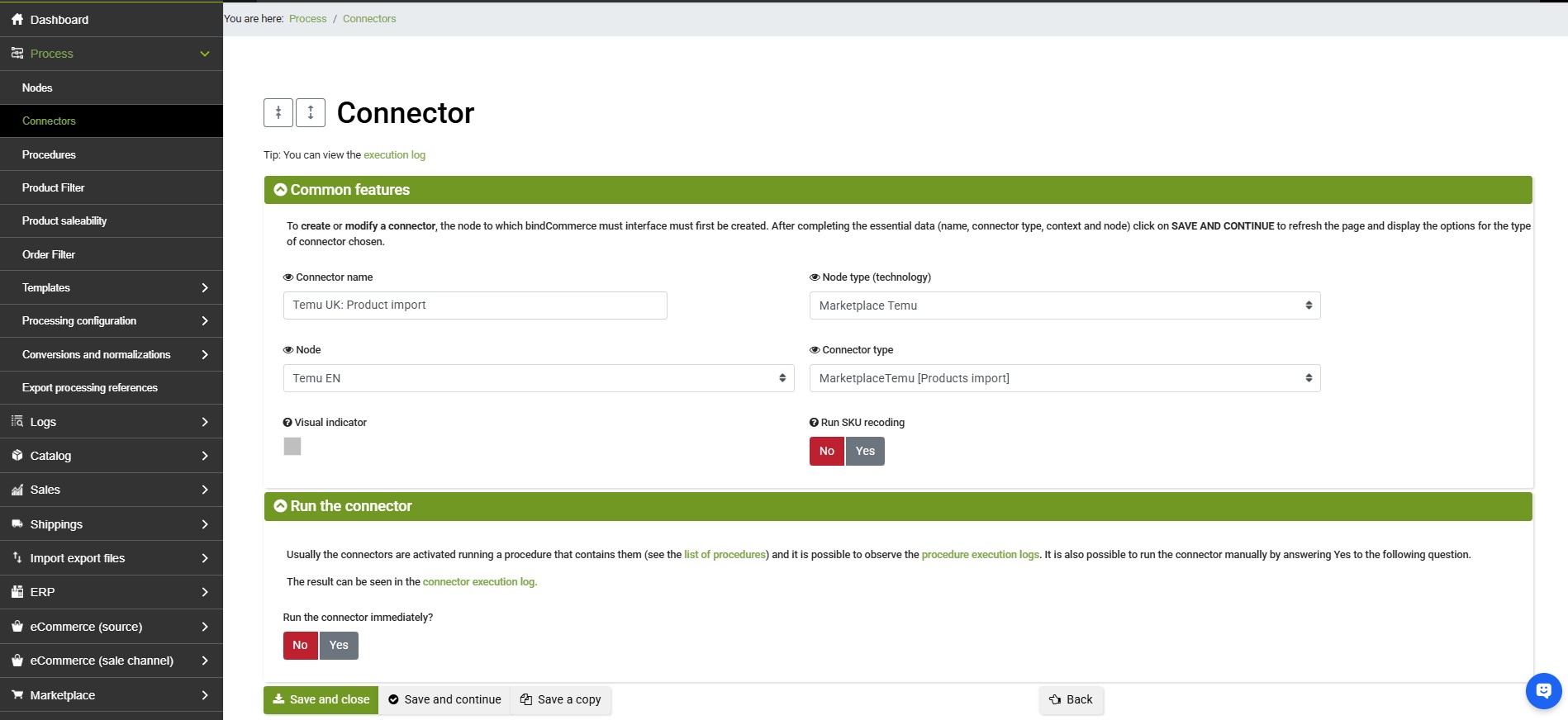
Connector creation
To create a Temu node, select from the bindCommerce menu:
Processes >> Connectors
Click the Add button to create a new connector and fill in the required fields:
- Connector name: Enter a descriptive name (e.g. Temu UK: offer download).
- Node type (technology): Select Temu Marketplace.
- Node: Choose the Temu node related to your account (previously configured).
- Connector type: Select Temu Marketplace [Import products].
Click SAVE AND CLOSE
To start the process, you can use the immediate execution icon or include the connector inside an automated procedure.
To verify proper operation, you should:
-
Check the Logs: Go to the menu Processes >> Logs to monitor the operation result and ensure there are no communication errors with the Temu APIs.
-
View the Offers: Go to the menu Marketplace >> Temu >> Temu Offer List to analyze the downloaded products, related SKUs, and offer statuses.
Process automation
To keep the data constantly updated, it is recommended to proceed as follows:
-
Create a dedicated Procedure in the menu Processes >> Procedures.
-
Add the offer download connector inside the procedure (generally before any connectors responsible for updating marketplace data, such as stock and prices).
-
Configure a periodic Schedule to make the offer import fully automatic.