

Follow the steps described in this article to update the offers (available quantity and prices) for products that already exist on Kaufland.

Important Note: When updating stock, the Kaufland marketplace also requires prices to be sent and updated. The two pieces of information are always managed and transmitted together.

Stock and price update configuration

The configuration can be created from the menu: Marketplace >> Kaufland >> Export products
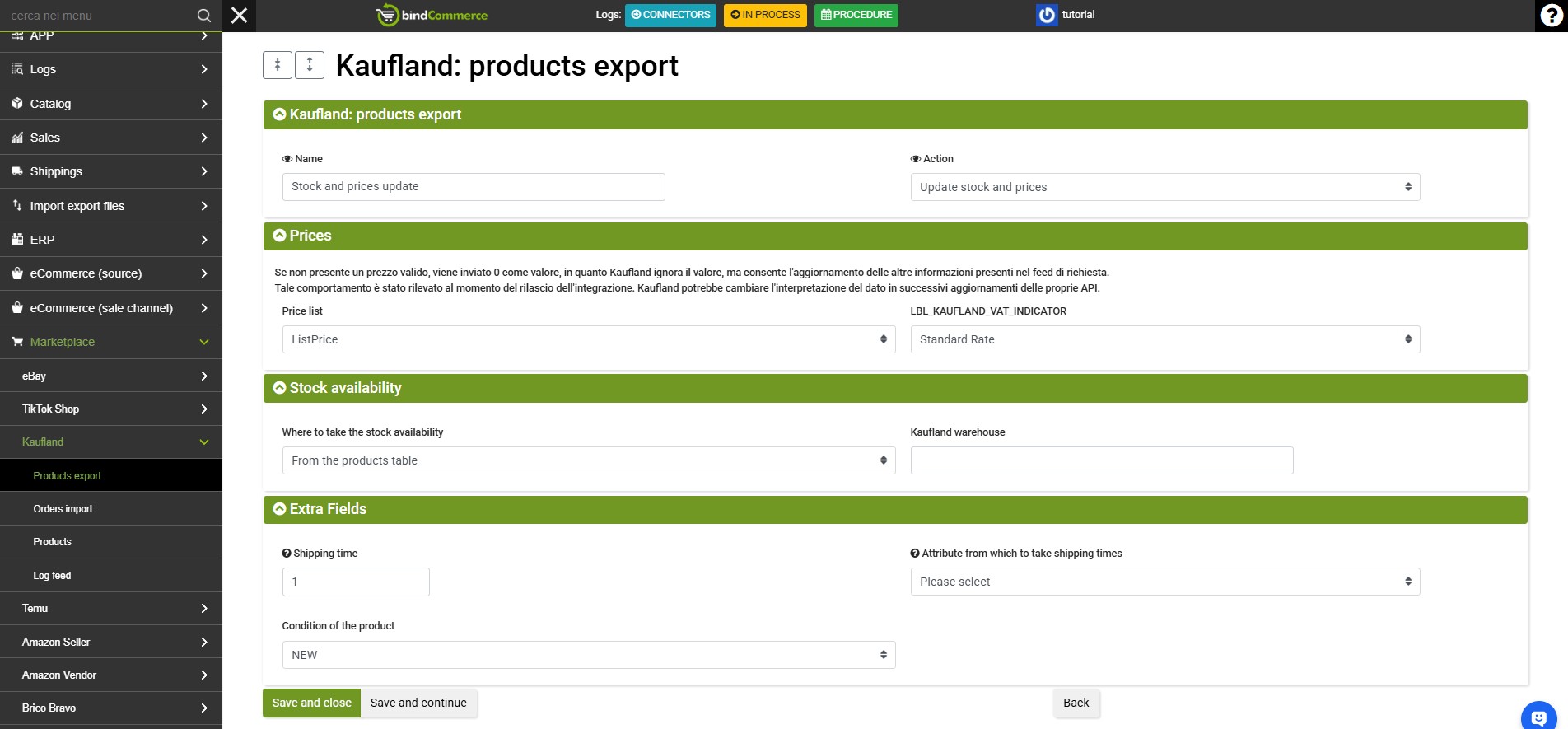
kaufland tutorial producs export

Click ADD to start and complete the following fields:

  • Name: enter a name that identifies the configuration (e.g. Kaufland - Stock and price update).
  • Action: select Stock and price update.
  • Export API configuration: select an existing configuration from the drop-down menu or create a new one by clicking the green + symbol.
  • Price list from which to retrieve prices: select the price list to be sent to Kaufland.
  • Where to retrieve stock from: select In the products table or any additional warehouses.
  • Kaufland warehouse: enter the numeric ID of the Kaufland warehouse to be updated.
  • Shipping time: enter the shipping time.
  • Product condition: specify the product condition.

Click SAVE to complete the configuration.

Creating the connector for stock and price updates

To create the connector for exporting stock and prices to Kaufland, go to the menu: Process >> Connectors
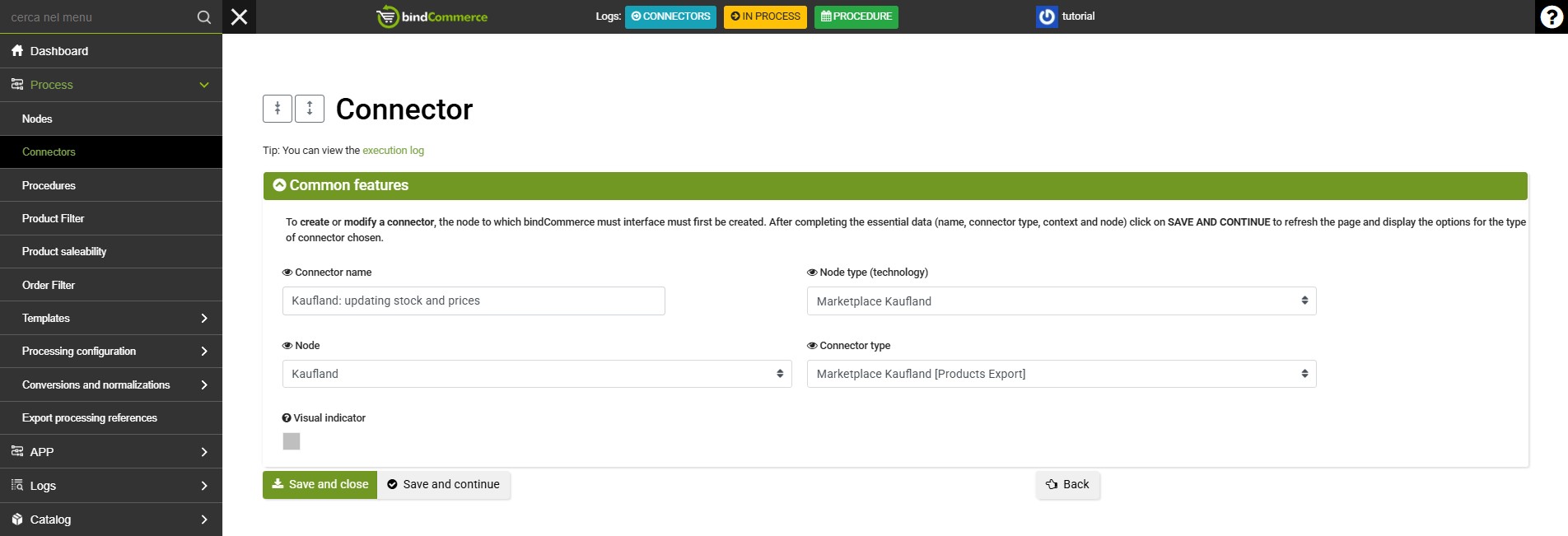
kaufland tutorial products export1

Click ADD to start and complete the fields as follows:

  • Connector name: enter a name of your choice that clearly identifies the purpose of the connector.
  • Node type (technology): Marketplace Kaufland
  • Node: select the Kaufland node.
  • Connector type: Marketplace Kaufland [Export products]

Click SAVE AND CONTINUE to display the next fields and complete the setup:

  • Connector configuration: select the configuration created previously.
  • Product filter: select a filter to limit the products to be updated (if no filter is selected, the offers for all products in the table will be updated).
  • Differential approach: enable the differential approach to send Kaufland only stock or price changes recorded since the last execution.
  • Connector execution: choose whether to run the connector immediately after saving or start it manually using the "Play" button in the connector list.

Click SAVE AND CLOSE to finish creating the connector.

Management and scheduling

After running the connector, you can check the system log both to review the operations performed and to download the data file and any transmission reports containing error messages or warnings.

  • Scheduling recommendation: It is recommended to include this connector in a frequently scheduled procedure (e.g. every hour or several times a day) with the differential approach enabled, in order to keep stock levels and prices on Kaufland constantly aligned.

0 of 5 - 0 votes
Thank you for rating this article.

Tutorials

bindCommerce platform
Nodes
Creating a Web Server node to publish images
Connectors
Procedures
Logs
Products
Categories
Product attributes
Price lists and prices
Manufacturers
Alternative descriptions
Payment and shipping methods
Orders
Customers
Filter setting on products
Filter setting on orders
Multi warehouse
Differential approach
Internal processing
How to use templates
Template gallery
Creation and customization of templates
Responsive photo gallery in eBay description
Creation and activation of a connector to create/update alternative descriptions
Match categories
Update Price List
Dynamic currency conversion
Internal processing script
Attribute enrichment script
Barcode type calculation
Generation of derived products
Order transformation
Quantity rules
Distribution grid
Conversions and normalizations
Conversions
Currency conversion
Order status normalization
SKU recoding
Marketplaces
eBay integration
eBay nodes installation
Matching with eBay categories
Sales terms
Parameters for listing generation
eBay listing generation
Download listings from eBay
Fixed price sale or auction
eBay listing details list
Listing update
Early ending of listings
Relisting
Responses from eBay and related logs
The automated workflow
Download orders from eBay
Download categories from the eBay shop and match with product categories
Matching of eBay categories international markets
Copy Manufacturer and MPN to Attributes
Amazon integration
Amazon node
PRE-SALE ACTIVITIES
Amazon listings and details
Creation and publication of products/offers to Amazon
Set up Amazon shipping templates
Products already on Amazon
Parameters configuration for preparing Amazon offers
Amazon offers generation connector
Creation of products already present on Amazon
New products publishing
Parameters configuration for preparing Amazon offers
Creation of products not present on Amazon
Amazon offers generation connector
Matches with Amazon categories
Selling on Amazon: Attributes tutorial
Clothing category tutorial
Shoes category tutorial
Responses from Amazon and related Logs
AFTER-SALES ACTIVITIES
Download orders from Amazon
Order status update from bindCommerce
Amazon Business integration
PRE-SALES ACTIVITIES
B2B prices
VAT classification
Discounts for quantities
AFTER-SALES ACTIVITIES
Amazon Business order download
Billing management
Upload invoices issued by Danea
Download invoices on Danea
Transfer of invoices issued by Amazon to Danea
Delivery preferences
Purchase Order Number
ePrice integration
ePrice listings preparation
ePrice node installation
Sending ePrice listings
Download ePrice orders
Creation of sample product files
Orders update to ePrice
ManoMano integration
ManoMano nodes installation
Send listings to ManoMano
Download orders from ManoMano
cDiscount integration
Category matching
Shipping methods mapping
Cdiscount node
Couriers mapping
Publishing new products on cDiscount
Publication of offers on Cdiscount
Import orders from Cdiscount
Cdiscount problem fixing
Allegro integration
Allegro node installation and configuration
Create Allegro Category Matches
Publishing products on Allegro
Product update on Allegro
Import orders from Allegro
AliExpress integration
AliExpress node installation
AliExpress category matching
Publishing products on AliExpress
Product groups and AliExpress brands
Download orders from AliExpress
Wish integration
Wish node installation
Publishing products on Wish
Carrier mapping for Wish
Download orders from Wish
Order update on Wish
Zalando integration
CONNECTED RETAIL
Zalando node installation (CR)
Offers management on Zalando (CR)
Import orders from Zalando (CR)
Leroy Merlin integration
Leroy Merlin node installation
Leroy Merlin pairing categories
Export products on Leroy Merlin
Offers publication on Leroy Merlin
Offers update on Leroy Merlin
Delete products/offers on Leroy Merlin
Downloading orders from Leroy Merlin
Orders update on Leroy Merlin
Conrad integration
Conrad node installation
Conrad category matching
Product creation on Conrad
Sending offers on Conrad
Removing products/offers from Conrad
Update offers on Conrad
Import orders from Conrad
Order update on Conrad
Temu integration
Temu Node Installation
Download Orders from Temu
Download Offers from Temu
TikTok Shop integration
TikTok Shop Node Installation
TikTok Shop Account Settings
Import Settings from TikTok Shop
TikTok Category Mapping
Product Creation on TikTok Shop
TikTok Order Import
Integration with Kaufland
Kaufland Node Installation
Downloading Offers from Kaufland
Updating Stock and Prices on Kaufland
Downloading Orders from Kaufland
Updating Orders on Kaufland
eCommerce
VirtueMart integration
VirtueMart node
Download orders from VirtueMart
Upload orders on Virtuemart
Upload products on VirtueMart
Download products from VirtueMart
Download product link from Virtuemart
WooCommerce integration
WooCommerce node
Download orders from WooCommerce
Download configurations from WooCommerce
Uploading orders on WooCommerce
Product publishing
Import products from Woocommerce
Plugin bindCommerce for WooCommerce
Product export
Prestashop integration
Prestashop node installation
Uploading orders on PrestaShop
Download orders from Prestashop
Downloading products from Prestashop
Product publishing on Prestashop
Connector for downloading Prestashop configurations
Magento integration
Magento node
Download orders from Magento
Upload orders on Magento
Product publishing on Magento
Import of Magento products
Shopify integration
Shopify node
Products import from Shopify
Publishing products on Shopify
Download configurations from Shopify
Integration of Mlveda's Multi Country Pricing App
Download orders from Shopify
Upload orders on Shopify
OpenCart integration
OpenCart node installation
Publishing products on OpenCart
Download orders from OpenCart
Import products from OpenCart
Uploading orders on OpenCart
Ecwid by Lightspeed integration
App installation and connection
Publishing products on Ecwid by Lightspeed
Import products from Ecwid
Import orders from Ecwid
Export orders from Ecwid
Integration with Wix
App Installation and Connection with Wix
Downloading Configurations and References from Wix
Product Publishing on Wix
Order Import from Wix
Social Networks
Facebook Catalogue integration
Configuring the Facebook Catalogue feed
Price comparators
Google Shopping integration
Translation and content enrichment
Integration with Google Translate
Integration with Icecat
Payment systems
Integration with PayPal
Import files
File format
Data file import
API for developers
API node
Export Orders
Import Products
Export Products
Documents import
Shipping update (legacy)

bindCommerce

bindCommerce s.r.l.

VAT Number IT07798861212 - SDI M5UXCR1
Registered in Napoli - REA: NA - 910618
Share capital € 20.000,00 fully paid
Tel: +39 011 089 122 0
E-mail: [email protected]

PON 2014>20 Riaccendiamo lo sviluppo