



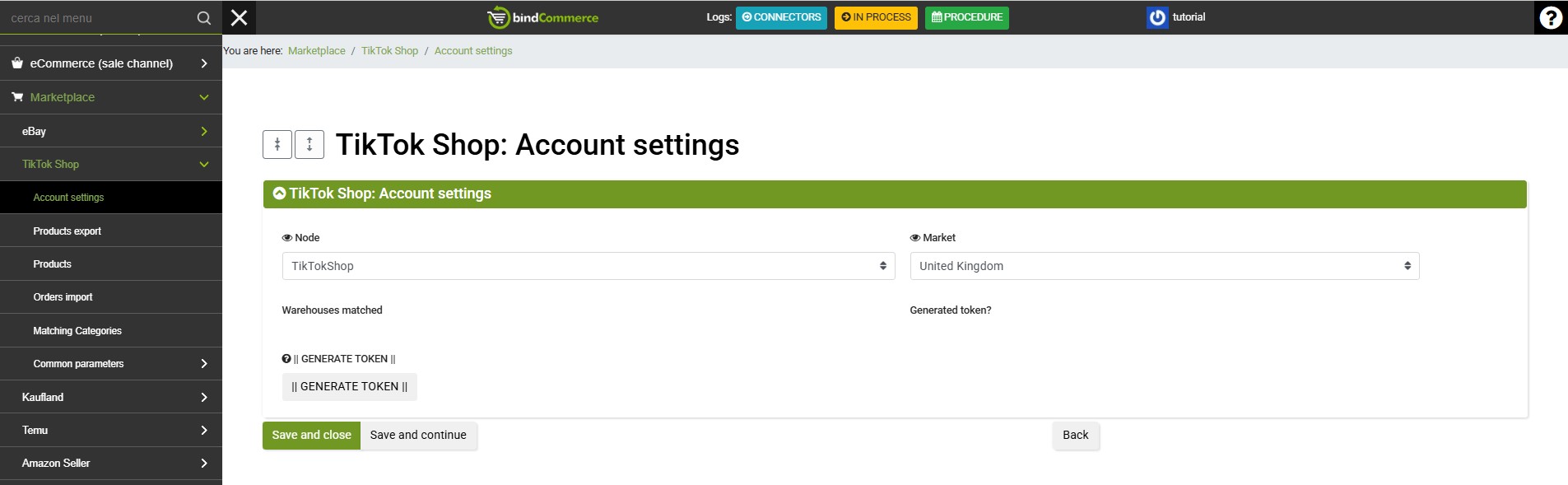
You can generate the TikTok token from the section available under the following menu:
Marketplace >> TikTok Shop >> Account Settings
On the page, click on Add and complete the fields as follows:
- Node: select the name of the TikTok Shop node created by following the relevant guide;
- Market: select the market in which you want to operate, for example Italy.
Click on SAVE AND CONTINUE.
Once the page has loaded, click on GENERATE TOKEN to be redirected to TikTok Shop and continue the process.
Continue on the TikTok website and approve the requested permissions. Once completed, you will be redirected back to bindCommerce and the "Token generated?" field will display a check mark to confirm that the operation was successful.
Once the operation has been completed successfully, the TikTok Shop identifier will automatically be added to the relevant node.
Now that the node configuration is complete, you can download your TikTok account settings (shops and warehouses) into bindCommerce using the connector for importing TikTok Shop settings.
Thank you for rating this article.